<?xml version="1.0" encoding="utf-8"?><feed xmlns="http://www.w3.org/2005/Atom" ><generator uri="https://jekyllrb.com/" version="4.4.1">Jekyll</generator><link href="/feed.xml" rel="self" type="application/atom+xml" /><link href="/" rel="alternate" type="text/html" /><updated>2026-11-27T22:33:08+00:00</updated><id>/feed.xml</id><title type="html">Alex Turnwall</title><subtitle>I’m Alex—a designer, developer &amp;amp; product strategist. I bring a founder’s mentality to building experiences, products, brands, and teams.</subtitle><author><name>alturnwall</name></author><entry><title type="html">On Layoffs</title><link href="/articles/on-layoffs/" rel="alternate" type="text/html" title="On Layoffs" /><published>2023-01-15T00:00:00+00:00</published><updated>2023-01-15T00:00:00+00:00</updated><id>/articles/on-layoffs</id><content type="html" xml:base="/articles/on-layoffs/"><![CDATA[<table>
  <tbody>
    <tr>
      <td>An open-ended, public experiment in writing shorter, less polished, less developed ideas that mimic my personal notes on a particular subject. <a href="/articles/note-to-self-a-2023-writing-experiment/">Learn more</a></td>
      <td><a href="/series/note-to-self/">Note to Self Series →</a></td>
    </tr>
  </tbody>
</table>

<p><a href="/series/note-to-self/">Note to Self</a>, Week 3</p>

<p>This is not the post I expected to make as of week 3 of my experiment, but here we are.</p>

<p>This week, Verily laid off over 200 people—about 15% of the total workforce. I had to see some colleagues and close collaborators go. I’m not in a position to comment on the why or the how, but as I observed a generational divide in co-worker responses, I realized that I had learned some hard lessons from past layoff experiences, and thought I’d share.</p>

<p><em>Now, a note/disclaimer/realization: I’m incredibly privileged to be in a position of not having been laid off myself, and I also realize that layoffs from high-paid tech companies, while still negatively impactful, are likely not as debilitating as layoffs from lower-wage jobs. I can’t, and don’t pretend to relate to or understand that situation, and I realize my place of privilege in that. All said, I still want to share these thoughts—they might help somebody through a hard time.</em></p>

<p>Folks who have been around the block a time or two were, like me, feeling sad for colleagues affected, thankful for our own jobs, perhaps a bit of survivor’s guilt.</p>

<p>What wasn’t there for me this time around was the extreme stress, guilt, and anxiety that I’ve experienced in the past.</p>

<p>The advice I’ve given to quite a few teammates this week is something like this:</p>

<ul>
  <li>It can be painful to realize, but this is part of business. Your employer, no matter whom, is at the end of the day a business and will respond to market demands. <strong>Whether or not that’s fair is totally beside the point</strong>—it’s the reality of the world we live in, so we should all realize that this can happen to any of us on any given day.</li>
  <li>Take that perspective, and use it to your advantage. Be optimistic, but realistic and don’t let work become all-consuming. Remind yourself of this when you feel the need to carve out a better work-life balance.</li>
  <li>Do the best job you can, and do right by the people you work with. Doing the best you can won’t always save you from a layoff, but doing right by the people you work with means that you’ll likely grow your network so that you’re more resilient when it happens.</li>
</ul>

<p>Like I said in a <a href="https://www.linkedin.com/posts/alexturnwall_opentowork-healthtech-ux-activity-7019257294022406144-BjT9/">LinkedIn post</a>—it’s a small world and careers are long.</p>

<iframe src="https://www.linkedin.com/embed/feed/update/urn:li:share:7019254283728506881" height="627" width="504" frameborder="0" allowfullscreen="" title="Embedded post"></iframe>

<p>Here’s a reminder to do good by people, because you never know when you’re going to work with them again, or be in a position to need help from them.</p>]]></content><author><name>alturnwall</name></author><category term="WorkLife" /><summary type="html"><![CDATA[An open-ended, public experiment in writing shorter, less polished, less developed ideas that mimic my personal notes on a particular subject. Learn more Note to Self Series →]]></summary></entry><entry><title type="html">On Personal Knowledge Management (PKM)</title><link href="/articles/personal-knowledge-management-pkm/" rel="alternate" type="text/html" title="On Personal Knowledge Management (PKM)" /><published>2023-01-08T00:00:00+00:00</published><updated>2023-01-08T00:00:00+00:00</updated><id>/articles/personal-knowledge-management-pkm</id><content type="html" xml:base="/articles/personal-knowledge-management-pkm/"><![CDATA[<table>
  <tbody>
    <tr>
      <td>An open-ended, public experiment in writing shorter, less polished, less developed ideas that mimic my personal notes on a particular subject. <a href="/articles/note-to-self-a-2023-writing-experiment/">Learn more</a></td>
      <td><a href="/series/note-to-self/">Note to Self Series →</a></td>
    </tr>
  </tbody>
</table>

<p><a href="/series/note-to-self/">Note to Self</a>, Week 2</p>

<p>Writing notes has become an extension of how I think, and an integral part of my workday and career. My digital hoarding of notes—and ongoing quest for better organization of them—is a big reason that I’m undertaking this 2023 <a href="/series/note-to-self/">Note to Self</a> writing experiment.</p>

<p>Over the years, I’ve amassed many thousands of pages of notes and writing, and have tried (and failed) various strategies of making better use of them. I started exploring better organization methods and discovered the concept of <a href="https://en.wikipedia.org/wiki/Personal_knowledge_management">personal knowledge management</a> (PKM), and have widely experimented to find tools, formats, and a processes that work for me.</p>

<p>Because of this, I’ve explored dozens of tools and methods for taking notes over the years. For about a decade I poured my thoughts into Evernote. For many reasons <em>(privacy concerns, vendor lock-in, UX)</em> I’ve been searching for a better alternative for years <em>(Notion, Google Keep, OneNote, Standard Notes, Logseq, Joplin, Roam, Remnote)</em>.</p>

<p>In early 2022, I settled on <a href="https://obsidian.md/">Obsidian</a>, hopefully for good.</p>

<p>It’s got a lot of bells and whistles, but the single most important thing that it (and other modern PKM tools) have over simpler note taking programs is linking between notes. Specifically, wiki-style linking that’s as fast as typing, and doesn’t require a note to exist previously.</p>

<p>Once linking your thoughts is second-nature, it opens up the addictive practice of personal knowledge management.</p>

<p>Below is a little bit of what I’ve learned in this process, with the hope of making it simpler for others to find the right tools, and hopefully inspire others to start their own PKM that might help them. This is an evergreen post that I’ll update over time as my process and tools change.</p>

<h2 id="why-write--take-notes">Why write / take notes?</h2>

<p>There are lots of articles out there that can tell you about the benefits of structured, regular writing. I’m a UX designer, product strategist, and developer that works in tech—you might call me a knowledge worker. For these types of roles, what you know and how you apply that info is how you advance in your career.</p>

<p>For me, it boils down to a few things:</p>

<ol>
  <li>I’m just not very good at remembering details, terms, and names. There are lots of those in my work, so I need a way to connect them all. Practically, I just don’t think I could do my job without taking notes, and as I saw this year, I am significantly more stressed and disorganized when I don’t have a good tool to help me. Searching my notes is something I do almost daily. I honestly think it’s helped me be a better systems thinker.</li>
  <li>Writing helps me think and learn</li>
  <li>PKM helps me find connections amongst my work</li>
  <li>Having a quickly <strong>searchable</strong> reference of things I’ve learned over the years has been extremely beneficial (even before I started the PKM and linking process described below).</li>
</ol>

<p>I’ve been surprised at what the practice of writing does for me. As a designer, I’m also a visual learner, but over the years I’ve learned that I need both in my process. Writing helps me learn new topics. Sketching and mind-mapping* help me make connections.</p>

<p class="mce-sidebar">*It just so happens that Obsidian recently launched their <a href="https://obsidian.md/canvas">Canvas</a> feature to help me combine both of these efforts digitally. I haven’t used it much yet, but it looks promising.</p>

<h2 id="how-i-take-notes-my-zettelkasten-process">How I take notes: my Zettelkasten process</h2>

<p>I follow something like the <a href="https://zettelkasten.de/introduction/">zettelkasten method</a>. The website linked has much better information than I can summarize here, so I’m going to quickly outline the process I’ve found works for me.</p>

<p>Note that I mention Obsidian-specific features here, but the tool doesn’t matter as much as the process. I did something very similar in other tools and simply found Obsidian to be the fastest/best for me for reasons I list at the end.</p>

<h3 id="daily-notes">Daily notes</h3>

<p><strong>Daily notes</strong> are simple bulleted list outlines. I take them every day that I work, and they’re always open on my computer while working. I also take personal notes on non-work days, though I’m less religious about this.</p>

<p>Basically, I start all writing on a daily note (with a title that’s in a sortable date format, like 2023_01_02). All of these “daily” notes are in a Journals folder. Obsidian lets you configure this easily in settings, so it automatically opens your daily note.</p>

<p>I use a strict bulleted-list outliner method for this (so my designer brain doesn’t worry about formatting). Each new meeting or topic of my day gets a new section with indented bulleted lists underneath.</p>

<div class="language-plaintext highlighter-rouge"><div class="highlight"><pre class="highlight"><code>- Here's the markdown format for my notes
    - It's just a dash and then space to make a bullet
    - Then a hard return and a tab to get an indent
    - I need to write quickly and focus on what other people are saying
    - Which means my daily notes are often in shorthand
    - Bulleted lists and a simple outliner format help me do this
</code></pre></div></div>

<p>Anytime a person, project, or large topic comes up, I make a link to it, simply by typing two opening brackets and then the word, like this:</p>

<div class="language-plaintext highlighter-rouge"><div class="highlight"><pre class="highlight"><code>- An example of a note about [[Alex Turnwall]] where I'm referencing a [[topic]] or [[project]] that I'm working on.
</code></pre></div></div>

<p>Obsidian magically changes the words Alex Turnwall, topic, and project into new, blank notes with the given titles. If the note already exists, I can see it from the handy quick search menu that opens as soon as I type <code class="language-plaintext highlighter-rouge">[[</code> in place.</p>

<p>In the moment of my daily notes, I don’t worry about that new note.</p>

<p>Importantly: I don’t worry about the organization of these and I use topics, tags, people, projects quite liberally. The whole idea is that important topics and links will emerge over time. Over-organizing at the beginning is counterproductive.</p>

<h3 id="pages-topics">Pages (topics)</h3>

<p>All of these start as the auto-generated back-links from by daily notes. Over time, these topic pages naturally grow. I highly recommend not actually adding too much content to these pages and not trying to organize them into folders (until you organically grow a list).</p>

<p>I try not to add too many notes to any of those groups—I still write most details in a daily note and make heavy use of links to ensure they all relate. That way, I can quickly see the list of backlinks or related links</p>

<p>A few types emerge in my notes naturally:</p>

<h4 id="people">People</h4>

<p>Coworkers, friends, authors. I don’t categorize these</p>

<h4 id="projects">Projects</h4>

<p>The day-to-day work I’m engaged in at my corporate job. Previously clients and sub-projects for them. Also personal projects.</p>

<h4 id="topics">Topics</h4>

<p>Groupings of information, loosely related to an idea. Some might call these <em>tags</em> or <em>categories</em>—I prefer not to make any distinction.</p>

<p>My examples include broad topics like: <em>PKM, code, legal, grids, typography, accessibility</em>; but also themes like: <em>pitching a book, design process, career development, mentoring designers, climate change</em>.</p>

<p>I’ve also got topics pages for things like <em>blog ideas</em> and <em>reading list</em>.</p>

<p>The point is to have a flat (no hierarchy) approach to creating connections.</p>

<h4 id="books--reading">Books / Reading</h4>

<p>These are special, because I often copy/paste or transcribe words directly from them onto a note for sections that I want to remember. This way I have a record of them that is official and I know these words are not my own. I can easily link to them but also create links from quotes to other topics so I can see how they all relate.</p>

<h3 id="articles">Articles</h3>

<p>These are longer-form pages that I start writing in my own words to summarize what I’ve learned. Some of them will be fleshed out enough to copy/paste onto this blog. Many will simply stay as my personal record of what I’ve synthesized on a subject.</p>

<p>This is really where I leave the sloppy outliner format behind and start using markdown to create hierarchy with headers.</p>

<h3 id="folders">Folders</h3>

<p>For any sets of articles that are organized around a single topic, or when I need to create multiple pages of written material.</p>

<p>Right now, my organization looks like this:</p>

<ul>
  <li>PKM Personal</li>
</ul>

<p>Archive</p>

<p>Folders {hodgepodge of past clients, projects, etc.}</p>

<p>Assets</p>

<p>Blog</p>

<p>Books</p>

<p>Information</p>

<p>Journals</p>

<p>Pages</p>

<p>Projects</p>

<ul>
  <li>Folders {ongoing project names}</li>
</ul>

<p>Templates</p>

<h3 id="personal-vs-work-notes">Personal vs. work notes</h3>

<p>First: I have an artificial constraint. I work for a company with very strict corporate data policies. While I can use Obsidian (in fact, this restriction lead me to Obsidian in the first place, and I’m glad it did), I have to keep my work notes limited to a local folder on my corporate computer, synced only with my corporate online drive. This means that I’m taking work notes in a totally separate work space (Obsidian calls them “vaults”). This has drawbacks, but it’s also freeing and focusing at the same time.</p>

<p>The sections below work the same for both my personal and corporate notes, but over time the organization has organically drifted.</p>

<p>Would I only have one if given the choice? Probably—I migrated all of my old consulting / freelance / personal business notes into my current personal vault, and I prefer the ease of linking between concepts. That said, there’s a ton (literally thousands) of cruft note entries that aren’t all that useful in perpetuity. So, I’ve actually come to appreciate the separation. It’s a toss up that doesn’t actually matter all that much if you use the tools the right way.</p>

<p>What if I have personal ideas during the work day? I simply take quick notes on my phone and dig in later. I could easily open up my personal vault on my corp machine, but that’s got some murky privacy and data ownership implications I’d rather not deal with.</p>

<h2 id="why-pkm-tools-why-obsidian">Why PKM tools? Why Obsidian?</h2>

<p>Obsidian itself doesn’t matter as much as the practice and process. That said, I prefer it for quick a few reasons at this point, and the “how” section below makes note of the methods in Obsidian.</p>

<p>Here’s my quick list of modern-PKM tool benefits</p>

<ul>
  <li>Linking (quick, wiki link style) between notes is the number one most important part of my PKM practice, which makes this more useful than simple daily note-taking</li>
  <li>Uses markdown standard formats and local storage. This means longevity of your work, and interoperability.</li>
</ul>

<p>Obsidian-specific benefits</p>

<ul>
  <li>Works very similarly on desktop and mobile</li>
  <li>Very extensible and customizable (I like the CSS option)</li>
  <li>Code/IDE-like interface, allowing multiple tabs, panes, windows that you can easily drag and drop between</li>
  <li>Great, and growing, community devoted to developing plugins and more</li>
  <li>Committed to open-formats like markdown</li>
  <li>Bonus:</li>
</ul>

<p>The Kanban plugin</p>

<p>Quick Obsidian setup:</p>

<ul>
  <li>One folder called “Personal PKM” that lives in my Google Drive</li>
  <li>It’s automatically synced between my laptop, the cloud drive website</li>
  <li>I can access on my phone (I use a workaround, but may invest in sync)</li>
  <li>Start with “Journals” and “Pages” folders.</li>
</ul>

<p>Journals for daily notes only</p>
<ul>
  <li>Pages for everything else, with no organization</li>
  <li>Over time your personal organization will emerge—it’s easy to move stuff around (Obsidian will correct all links for you if you move within app)</li>
</ul>

<h2 id="further-reading">Further Reading</h2>

<ul>
  <li><a href="https://zettelkasten.de/posts/overview/">Zettelkasten.de</a></li>
  <li><a href="https://kadavy.net/blog/posts/zettelkasten-method-slip-box-digital-example/">Digital Zettelkasten</a></li>
</ul>]]></content><author><name>alturnwall</name></author><category term="WorkLife" /><summary type="html"><![CDATA[An open-ended, public experiment in writing shorter, less polished, less developed ideas that mimic my personal notes on a particular subject. Learn more Note to Self Series →]]></summary></entry><entry><title type="html">Note to Self—a 2023 writing experiment</title><link href="/articles/note-to-self-a-2023-writing-experiment/" rel="alternate" type="text/html" title="Note to Self—a 2023 writing experiment" /><published>2023-01-01T00:00:00+00:00</published><updated>2023-01-01T00:00:00+00:00</updated><id>/articles/note-to-self-a-2023-writing-experiment</id><content type="html" xml:base="/articles/note-to-self-a-2023-writing-experiment/"><![CDATA[<p>An open-ended, public experiment in writing shorter, less polished, less developed ideas that mimic my personal notes on a particular subject.</p>

<p><a href="/series/note-to-self/">Note to Self</a>, Week 1</p>

<p>Welcome to <em>Note to Self</em>—my open-ended, in-public experiment in writing shorter, less polished, less developed ideas that mimic my personal notes on a particular subject. I’ve had a backlog of ideas growing in my personal notes over the past few years, and I’m trying this experiment to force myself to share in the hope that it helps me figure out where to focus my time.</p>

<p>(The <a href="/articles/personal-knowledge-management-pkm/">next post</a> will probably be is about my process in personal knowledge management, or PKM, which largely lead to this experiment.)</p>

<h2 id="the-what">The what</h2>

<p>In order to force a new habit, I’m going to post weekly entries that summarize some of the many “notes to myself” that I’ve accumulated over the years, somewhat edited for public consumption. I’ll probably focus on observations and reflections about work/life, careers, design, tech and other professional subjects. There may be some more personal topics mixed in. Similar to my actual notes, I’ll likely add to individual posts over time and try to make connections between them.</p>

<h2 id="the-why">The why</h2>

<p>I’m a pretty obsessive note-taker, but I’ve been bad at sharing the ideas contained in those notes. Sitting privately, they are useful to me, but I suspect not as useful as when I share them publicly. I’ve been pleasantly surprised in the past at what happens when you share ideas publicly.</p>

<ul>
  <li>I view writing as a way of better developing ideas, and sharing those ideas online as a way of increasing the possibility of interesting connections.</li>
  <li>I attribute part of my early-career success to writing and freely sharing ideas online, and I’ve been in somewhat of a routine these last few years in tech, looking to replicate some of the random connections that lead to interesting paths forward. I’m hoping that sharing more may reveal new paths forward.</li>
  <li>The challenge for me is time and quality: I’ve been hoarding ideas without the time to develop them in to professional-quality pieces of writing that I’ve been willing to share. So, I needed a format that felt different. Framing these as “notes to self” sort of allows me to be more experimental.</li>
  <li>This is also an excuse for me to have more content so I can spend a little more time playing with design and code on my personal site. I don’t really code at work anymore, and the type of design I do is more focused on products that need to be more constrained—I miss playing around with personal site design.</li>
</ul>

<h2 id="the-rules">The rules</h2>

<p>The rules will probably change over time. For now:</p>

<ul>
  <li>Actually experiment in public: it’s more important to publish weekly than it is to get it perfect.</li>
  <li>These are intended to be somewhat “evergreen” topics—they’ll likely evolve over time.</li>
  <li>Ask for feedback offline: structure writing in a way that seems “in progress” and not too sacred, so giving feedback seems natural. It should feel like in-progress design work that is open to critique and hopefully opens up conversation.</li>
  <li>Make it personal: I’m not aiming for authoritative research pieces, rather my personal takes and opinions. That said, they should have a professional tone.</li>
</ul>

<h2 id="where-you-come-in">Where you come in</h2>

<p>I want to know what you think! Please drop me a line at <a href="mailto:alex@turnwall.com">alex@turnwall.com</a>. I won’t know if the experiment is working unless I get some feedback.</p>

<p>Comments, arguments, criticism, editing errors, stylistic choices, or simple words of acknowledgement and encouragement—I want to hear all of it. Feedback will help me figure out what topics are most interesting to folks.</p>

<p>Thanks for reading—I hope something I write ends up being useful to you in some way.</p>

<p>—Alex—</p>]]></content><author><name>alturnwall</name></author><category term="Musings" /><summary type="html"><![CDATA[An open-ended, public experiment in writing shorter, less polished, less developed ideas that mimic my personal notes on a particular subject.]]></summary></entry><entry><title type="html">Does business need design? A talk at Scout Studio</title><link href="/articles/does-business-need-design/" rel="alternate" type="text/html" title="Does business need design? A talk at Scout Studio" /><published>2018-03-19T00:00:00+00:00</published><updated>2018-03-19T00:00:00+00:00</updated><id>/articles/does-business-need-design</id><content type="html" xml:base="/articles/does-business-need-design/"><![CDATA[<p><em>Scout is the student-led design studio at Northeastern University, which I helped found as a faculty advisor a few years ago. You should <a href="https://web.northeastern.edu/scout/">check them out</a>—they’re doing incredible work!</em></p>

<p>I recently gave a talk for <a href="https://web.northeastern.edu/scout/">Scout Studio</a> on the topic of measuring the ROI and impact of design practices in business. <em>(Slides included at the end of the post.)</em></p>

<p>I think it was terrible.</p>

<p>But I learned something. More on that below.</p>

<p>The thesis of the talk sort of comes down to this:</p>

<p><strong>How effective are my designs?
How <em>do</em> we evaluate design?
What’s the impact of my work?</strong></p>

<p>In my experience, the best designers are always asking themselves these questions.</p>

<p>And if you make the decision to start your own business or move into a management role, you no longer have the <em>option</em> of asking these questions—you have to have the answers to report back to your business stakeholders or clients, and you need to have grounds for evaluating your team.</p>

<p>But back to my <em>delivery</em> of the talk: do you ever have those out-of-body moments?</p>

<p>I could see my past undergraduate self sitting in the room, listening to me bore him to death, as I realized that my talk needed a lot more context to make the information interesting. Granted, I do think I was sharing <em>some</em> novel information that was useful to some of the folks in the room, but I certainly wasn’t doing my best to make it engaging. It felt more like a dry <em>Calc 101</em> lecture than the Ted Talks that I admire.</p>

<p>So the new question for me: <strong>how can I make this content more engaging?</strong> How can I tell a better story around it?</p>

<p>I don’t have a great answer for this right now, but I’m going to continue to work on it, because I think this stuff is important, and understanding and using metrics to measure design impact is still under-utilized.</p>

<p>What I learned is that <em>I actually get excited about this stuff!</em> The work I’ve been focusing on lately is more managerial than individual contribution—and that means measuring impact.</p>

<p>But I forgot my audience (designer <em>faux pas</em> number one). Undergraduate students don’t come to this from the same context as me. In design school, you have goals and you’re graded on them. Did the assignment meet the parameters? Did you solve this problem? Can you defend your solution in critique?</p>

<p>Those are all well and good, but in business context, we don’t need to justify decisions with rhetoric—there are a whole bunch of tools and techniques we can use to actually measure the <em>impact</em> that our work made on our actual audience.</p>

<p>What I do know is that the onus is on us as design professionals to present the impact of our work, whenever we talk about it—in our portfolios, at our jobs, or in the classroom. Framing all design solutions from the perspective of impact will help our profession as a whole establish the guidelines for which we judge effectiveness, and help a new generation of designers ensure that design continues to have a more vocal seat at the table.</p>

<p><em>[Embedded: Slideshare presentation — “Does Business Need Design?”]</em></p>]]></content><author><name>alturnwall</name></author><category term="Design" /><summary type="html"><![CDATA[Scout is the student-led design studio at Northeastern University, which I helped found as a faculty advisor a few years ago. You should check them out—they’re doing incredible work!]]></summary></entry><entry><title type="html">WordPress: find posts with ANY term in a given taxonomy</title><link href="/articles/find-posts-with-any-term-in-a-given-taxonomy/" rel="alternate" type="text/html" title="WordPress: find posts with ANY term in a given taxonomy" /><published>2017-02-19T00:00:00+00:00</published><updated>2017-02-19T00:00:00+00:00</updated><id>/articles/find-posts-with-any-term-in-a-given-taxonomy</id><content type="html" xml:base="/articles/find-posts-with-any-term-in-a-given-taxonomy/"><![CDATA[<p>I was recently Googling around for an answer to this, and didn’t see that anyone posted this method, but here’s the gist.</p>

<p>If you want to find out if a given post has a certain taxonomy, (not just <em>a specific term</em>, but <em>ANY term</em> in that taxonomy), you can use the function <code class="language-plaintext highlighter-rouge">has_term</code> (more <a href="https://codex.wordpress.org/Function_Reference/has_term">in the codex</a>):</p>

<div class="language-php highlighter-rouge"><div class="highlight"><pre class="highlight"><code><span class="cp">&lt;?php</span> <span class="nf">has_term</span><span class="p">(</span><span class="s1">''</span><span class="p">,</span> <span class="nv">$taxonomy_name</span><span class="p">);</span> <span class="cp">?&gt;</span>
</code></pre></div></div>

<p>The first blank set of quotes essentially means it’ll return true if any term exists within the given taxonomy.</p>

<p>For example, let’s say you’re writing about books and have a custom taxonomy called “genre.” Your genres, or <em>terms</em> might be something like <em>“fiction,” “mystery,” “sports,” “history</em>,” etc. In this example, if you wanted to find out if a post was given the <em>genre</em> “mystery,” you could use the following code:</p>

<div class="language-php highlighter-rouge"><div class="highlight"><pre class="highlight"><code><span class="cp">&lt;?php</span> <span class="nf">has_term</span><span class="p">(</span><span class="s1">'mystery'</span><span class="p">,</span> <span class="s1">'genre'</span><span class="p">);</span> <span class="cp">?&gt;</span>
</code></pre></div></div>

<p>And if you simply wanted to see if a post is assigned any genre, you’d use the empty first term version:</p>

<div class="language-php highlighter-rouge"><div class="highlight"><pre class="highlight"><code><span class="cp">&lt;?php</span> <span class="nf">has_term</span><span class="p">(</span><span class="s1">''</span><span class="p">,</span> <span class="s1">'genre'</span><span class="p">);</span> <span class="cp">?&gt;</span>
</code></pre></div></div>

<p>Think about this in the simpler conditionals for WordPress categories: <code class="language-plaintext highlighter-rouge">&lt;?php in_category( $category ); ?&gt;</code> and <code class="language-plaintext highlighter-rouge">&lt;?php is_category( $category ); ?&gt;</code> works.</p>

<p>But the same is not true for custom taxonomies. The function <code class="language-plaintext highlighter-rouge">is_tax( $taxonomy )</code> works as expected, but there is no corresponding <code class="language-plaintext highlighter-rouge">in_tax( $taxonomy )</code> function.</p>

<p>Instead, use the code above!</p>]]></content><author><name>alturnwall</name></author><category term="Code" /><summary type="html"><![CDATA[I was recently Googling around for an answer to this, and didn’t see that anyone posted this method, but here’s the gist.]]></summary></entry><entry><title type="html">Bicycles are my design inspiration—a Rapha 5×5 talk</title><link href="/articles/bicycles-design-inspiration/" rel="alternate" type="text/html" title="Bicycles are my design inspiration—a Rapha 5×5 talk" /><published>2016-10-13T00:00:00+00:00</published><updated>2016-10-13T00:00:00+00:00</updated><id>/articles/bicycles-design-inspiration</id><content type="html" xml:base="/articles/bicycles-design-inspiration/"><![CDATA[<p>I was recently invited to speak at an event called <strong>Rapha 5×5: Intervals on Design</strong> at Fresh Tilled Soil, a local design consultancy. It’s a traveling series of design talks that Rapha runs in different cities, and here’s the schtick:</p>

<p><em>“5×5: Intervals on Design, a rapid-fire design talk where five creatives will talk for five minutes at a time about the intersection of design and cycling in relation to their lives.”</em></p>

<p>I tend to take prompts quite literally, so I took the “rapid-fire” to heart and really tried to cram my talk into exactly 5 minutes. Since it was dubbed an “interval” (a type of high-intensity workout) I figured it should probably feel pretty frantic (perfect for my normal presentation style anyways).</p>

<p>So if you can, read everything below with a super rushed, almost out-of-breath, fast-paced presenter in your mind. It’ll give you the best mental image of the night.</p>

<hr />

<h5 id="the-talk">The Talk:</h5>

<h2 id="bicycles-are-my-design-inspiration">Bicycles are <em>my</em> design inspiration</h2>

<p>I guess I’m here because I like bikes, <em>and</em> I’m a professional designer. Unlike the other panelists, my interest in bikes doesn’t overlap with my profession—except for a handful of past projects for bike organizations—but that’s not what I’ll talk about here.</p>

<p>Right now I’m the Chief Design Officer at BevSpot, a local software startup. Startups are fast paced and pretty stressful, and I quite honestly don’t think I’d be able to do the job without bikes in my life. That might sound superficial, but I really mean it. Bikes have been a big part of my life, and everything about them really inspires me and my design work in perhaps unexpected ways.</p>

<p>So today, I thought I’d sweat out five quick “intervals” on why I draw inspiration from bikes—the act of biking, their form, their function, their history—in hopes that one of these tidbits may inspire another designer out there.</p>

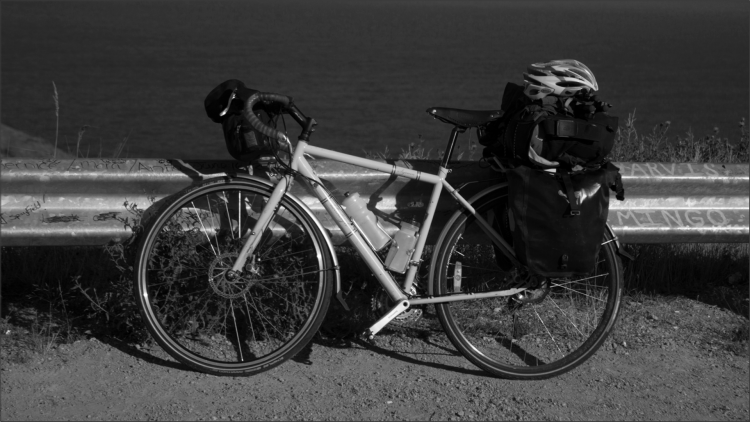
<p>This is one of my bikes when I’m at my happiest moment: fully loaded for a tour in the middle of nowhere:</p>

<p><img src="http://www.turnwall.com/wp-content/uploads/2016/10/Artboard-1-750x422.png" alt="Photo of my touring bike, loaded with gear" /></p>

<p>This sort of represents everything I love about bikes—exercise, utility, excitement, beauty, travel—personalized to be exactly what I need in the moment. More on that later.</p>

<p>Let’s start with what I hope is an obvious benefit of biking for any cyclist in the room: it’s fun!</p>

<h3 id="interval-1-biking-as-fun">Interval 1: biking as fun</h3>

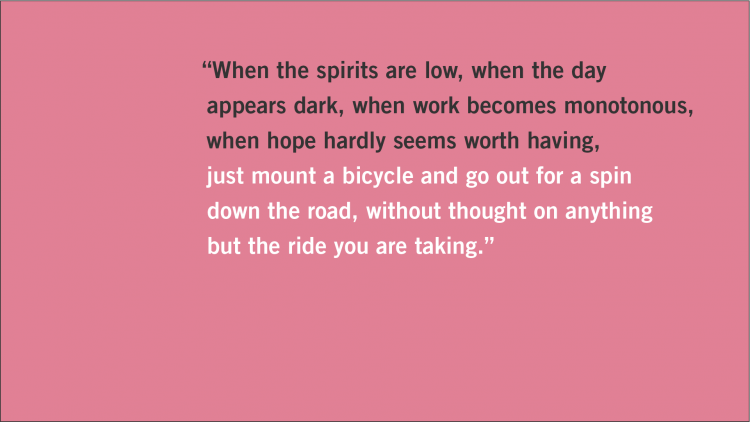
<p>The act of riding is fun, duh! And having fun—taking your mind off of whatever you have going on—is therapeutic and can serve as space for inspiration, in and of itself. Clearly the folks in the room share that opinion, but let’s add some gravitas to that. Take this quote:</p>

<p><img src="http://www.turnwall.com/wp-content/uploads/2016/10/Artboard-2-copy-750x422.png" alt="Quote: &quot;When the spirits are low, when the day appears dark, when work becomes monotonous, when hope hardly seems worth having, just mount a bicycle and go out for a spin down the road, without thought on anything but the ride you are taking.&quot;" /></p>

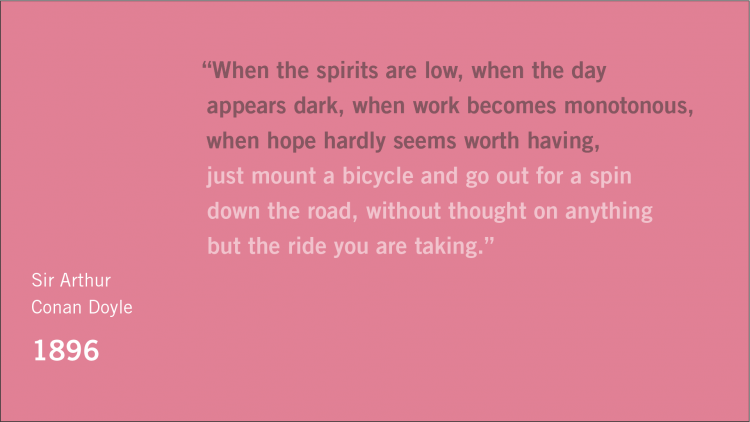
<p>Does anyone know who said that?</p>

<p><img src="http://www.turnwall.com/wp-content/uploads/2016/10/Artboard-2-copy-2-750x422.png" alt="Quote: &quot;When the spirits are low, when the day appears dark, when work becomes monotonous, when hope hardly seems worth having, just mount a bicycle and go out for a spin down the road, without thought on anything but the ride you are taking.&quot; Attribution: Sir Arthur Conan Doyle, 1896" /></p>

<p>Sir Arthur Conan Doyle (author of Sherlock Holmes) said this **over 100 years ago. **Biking has been a fun, therapeutic inspiration for over 100 years!</p>

<p>I don’t know about you, but I need a mechanism for detaching from increasingly stressful days and giving my brain space to relax and just think. I really think that my commute—a combined total of about an hour and a half of biking per day—give me the head space to ground myself before a day at the office, and the recharge that I need at the end of a day to prevent burn out.</p>

<p>And if you’re doing it right—really only thinking about the ride that you’re taking—then maybe you <em>won’t</em> find yourself here:</p>

<p><img src="http://www.turnwall.com/wp-content/uploads/2016/10/Artboard-2-750x422.png" alt="Yep, that" /></p>

<p>In a very Zen manner, bikes constantly have a way of reminding me about focus.</p>

<p>Alright, so biking itself can be inspirational, but what about the bike itself?</p>

<h3 id="interval-2-bikes-as-successful-product">Interval 2: bikes as <em>successful</em> product</h3>

<p>Being at a startup everyday, I’m constantly thinking about <em>what makes a successful product</em>.</p>

<p>As product designers, I think one of the things we all do is look at precedents in the market—we want to know what the success stories are—and these serve as inspiration for our own work.</p>

<p>Well, bikes are <strong>hugely successful</strong> on many metrics, despite what you may think of them here in the States today. First things first, they’re the most popular vehicle in the world today.</p>

<p><img src="http://www.turnwall.com/wp-content/uploads/2016/10/Artboard-1-copy-750x422.png" alt="Bikes: the most popular vehicle in the world today. Chart shows 1.4 billion bikes vs. only 400 million cars." /></p>

<p>This info comes from a fascinating <a href="http://www.princeton.edu/~ina/infographics/index.html">2003 Princeton study, told in infographics</a> designed by Jonathan Harris. Still worth a look.</p>

<p>Worldwide, there are more than three times the number of bikes in service today than there are cars.</p>

<p>Not only are bikes the most popular vehicle—they’re also the best at what they do, at least based on one measurement:</p>

<p><img src="http://www.turnwall.com/wp-content/uploads/2016/10/Artboard-2-copy-3-750x422.png" alt="Bikes: the single most efficient land vehicle (measured as the greatest distance traveled per weight per unit of energy expended). Bikes get 3,000 avg. mpg when converted from calories burned. 23 is the avg. mpg. of cars and light trucks in the U.S." /></p>

<p>They’re <strong>incredibly efficient</strong>. Now, any engineers in the room can argue over these stats ad nauseum—but work with me here: I think we can all agree that for transporting <em>ourselves</em>, modern bicycles are one of the most efficient ways to do it around.</p>

<p>So bikes are successful in the market because they’re good at what they do. Sounds like a good product to me. But, the really great products out there aren’t just good, they’re transformational for their users. Let’s explore:</p>

<h3 id="interval-3-bikes-as-impactful-product">Interval 3: bikes as <em>impactful</em> product</h3>

<p>In America today—where the car is the unfortunate king and biking is generally regarded as recreation—we might forget just how impactful bikes have been to our whole society in the past.</p>

<p>They were actually such an important form of transportation in America (and still are in many places today) that they spurred the development of many of the innovations that literally paved the way for automobiles: paved roads, the pneumatic tire, road signage, traffic regulation, mass production techniques, lightweight steel production, gearing, brakes, and more.</p>

<p>Working on bikes in their shop even led Orville and Wilbur Wright (bike mechanics by trade) to the development of the first airplane!</p>

<p>There are hundreds of technological advances, but let’s look at an even more important impact :</p>

<p><img src="http://www.turnwall.com/wp-content/uploads/2016/10/Artboard-2-copy-4-1-750x422.png" alt="Quote: &quot;Let me tell you what I think of bicycling. I think it has done more to emancipate women than anything else in the world. It gives women a feeling of freedom and self-reliance. I stand and rejoice every time I see a woman ride by on a wheel... the picture of free, untrammeled womanhood.&quot; Attribution: Susan B. Anthony" /></p>

<p>We may forget that it was the importance of bicycles as a means of transportation that lead to women being able to ditch the Draconian long dresses and <em>actually</em> wear the pants. This set in motion the movement that saw women leave traditional roles behind to join the workforce, travel, and find recreation that was previously reserved for men.</p>

<p>But it wasn’t just women as a group who were emancipated with the rise of the bicycle. Due to its relative low cost, high availability, and efficient form of transportation, bicycles were a socioeconomic equalizer, increasing the speed and availability of travel for folks from all walks of life:</p>

<blockquote>
  <p>“It is the great leveler, for not ’til all Americans got on bicycles was the great American principle of every man is just as good as any other man…fully realized.”</p>

  <p>– Robert Smith, in Scientific American, 1896.</p>
</blockquote>

<p>If that’s not an inspirational impact for a product, I don’t know what is.</p>

<h3 id="interval-4-bikes-as-a-model-for-product-adoption">Interval 4: bikes as a model for product adoption</h3>

<p>Despite the success stories above, bikes weren’t exactly an overnight sensation:</p>

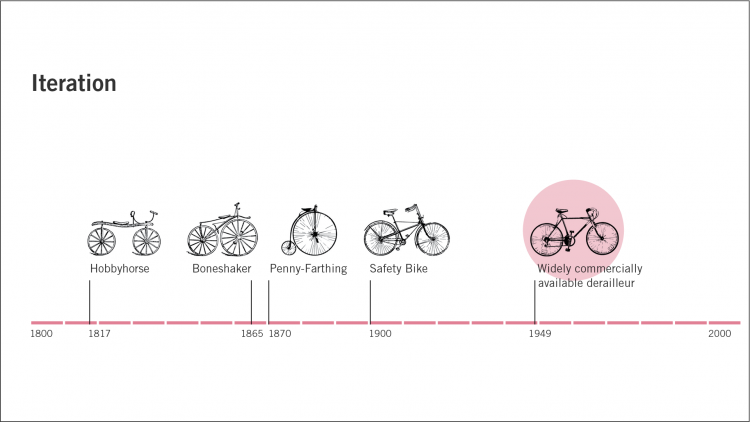
<p><img src="http://www.turnwall.com/wp-content/uploads/2016/10/Artboard-2-copy-5-750x422.png" alt="Chart: showing the iteration of bicycle development over time from 1800 to 2000" /></p>

<p>The precursors of the modern bicycle started over 200 years ago, and it took almost the first 100 years to get it “right”—what you might call a “product-market fit”. The “safety bike” hit streets right around 1900, and this is the first commercial example that shares the classic frame design that we know today.</p>

<p>Still, it wasn’t for another half century that another innovation would make the bike a huge commercial success, something that we totally take for granted today: the derailleur:</p>

<p><img src="http://www.turnwall.com/wp-content/uploads/2016/10/Artboard-1-copy-2-1-750x422.png" alt="Chart: showing the iteration of bicycle development over time from 1800 to 2000 with adoption overlay" /></p>

<p>Excuse the not-really-scientific chart here, but I think it’s worth viewing the history of how the modern bike came to be.</p>

<p>The bicycle’s history of iteration and adoption that looks something like how we think about modern technology adoption with the <a href="https://en.wikipedia.org/wiki/Diffusion_of_innovations">diffusion of innovations</a>—the rough bell curve breaking the rise of product user adopters into groups of innovators, early adopters, the early majority.</p>

<p>It’s a reminder that, well, <em>Rome wasn’t built in a day</em>—things take time. And sometimes, it’s not the initial idea that’s the winner—it’s the innovations on top of that initial concept that bring a product to the masses.</p>

<p>Today’s modern bicycle—the multi-billion dollar industry, and agent of social reform wasn’t a smash hit until designers, inventors, innovators took the initial form and made it better for the constantly changing face of it’s users.</p>

<hr />

<p>So, biking is fun and it’s good for you, bikes are a successful product, their use is impactful, and they remind us of how to improve over time. But more than all of that, they’re a tool for you, personally, to use as you want.</p>

<h3 id="interval-5-bikes-as-tool">Interval 5: bikes as tool</h3>

<p>Alright, do me a quick favor. Think for just a second about your favorite bike. Then think about your favorite feeling on that favorite bike.</p>

<p>Let’s go back now to my happy bike place:</p>

<p><img src="http://www.turnwall.com/wp-content/uploads/2016/10/Artboard-1-750x422.png" alt="" /></p>

<p>I love this bike because it allows me to travel great distances while getting exercise and being outside. It’s the accomplishment of the climb with the thrill of the descent, coupled with a self-sufficient practicality and explore-anywhere mentality that is liberating.</p>

<p>This might be pretty different than the bike you thought of.</p>

<p>You might have pictured a super lightweight, svelte road bike sprinting down the final stretch to a podium. Maybe you pictured a big dual-suspension mountain bike cranking down a tight section of single track in the middle of the woods. Maybe you pictured your stylish city cruiser, zipping past lines of cars downtown. Whatever your image, you pictured a tool that helps you get some desired response.</p>

<p>It’s the flexibility of that tool that I really love.</p>

<p>Bikes are a customizable, extendable tool <em>system</em> that people have been using to do what they need or want to do for over two centuries. The fact that we’re still dreaming up innovations for the core system of the bike is inspirational to me, a reminder that bikes are simple enough to make anyone feel like an inventor in their own right.</p>

<p>So I’ll leave you with a challenge to conjure up your inner Orville and Wilbur Wright:</p>

<h3 id="challenge-what-else-can-you-do-with-your-bike">Challenge: what else can you do with your bike?</h3>

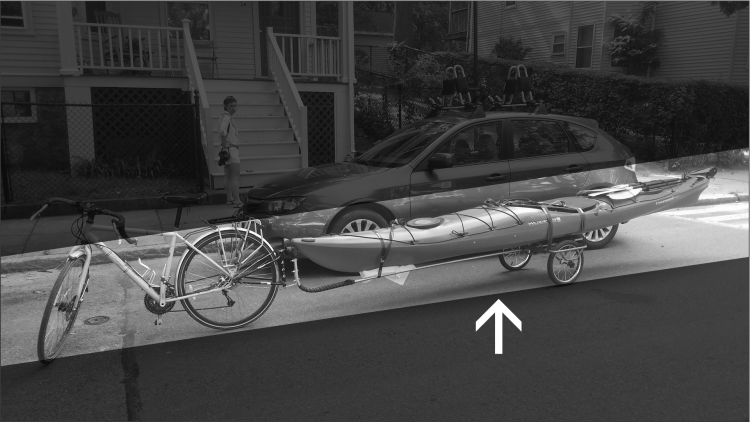
<p>This is a picture of my bike from before, but instead of being loaded for a tour, it’s loaded with a trailer behind it, pulling my kayak, ready to head to the beach.</p>

<p><img src="http://www.turnwall.com/wp-content/uploads/2016/10/Artboard-2-copy-8-750x422.png" alt="" /></p>

<p>I made that trailer to help me spend more time doing what I love—being outside. But I was inspired to build it because I saw somebody else pulling a trailer behind their bike full of furniture—they were moving by bike!</p>

<p>Bikes—and the people that ride and make them—inspire me and remind me to adapt my tools to what I need them to be, and to think of new ways of doing more with what we have. Bikes remind me that piecemeal changes, combined over time, can yield truly innovative and transformative designs.</p>

<p>What will yours be?</p>

<p>Thanks.</p>

<hr />

<p>It was a super fun night listening to the different ways that bikes have inspired other folks… so even if you missed it, hopefully this inspires you to get back on your bike, and maybe think about it just a little differently.</p>

<p>Happy riding.</p>

<blockquote>
  <p>When design meets cycling you get a full house. <a href="https://t.co/vRarOkXxTr">pic.twitter.com/vRarOkXxTr</a></p>

  <p>— Fresh Tilled Soil (@freshtilledsoil) <a href="https://twitter.com/freshtilledsoil/status/786344223100600320?ref_src=twsrc%5Etfw">October 12, 2016</a></p>
</blockquote>]]></content><author><name>alturnwall</name></author><category term="Design" /><summary type="html"><![CDATA[I was recently invited to speak at an event called Rapha 5×5: Intervals on Design at Fresh Tilled Soil, a local design consultancy. It’s a traveling series of design talks that Rapha runs in different cities, and here’s the schtick:]]></summary></entry><entry><title type="html">Unique styling with custom classes added to the body tag in WordPress</title><link href="/articles/adding-custom-classes-to-the-body-tag-in-wordpress/" rel="alternate" type="text/html" title="Unique styling with custom classes added to the body tag in WordPress" /><published>2016-09-16T00:00:00+00:00</published><updated>2016-09-16T00:00:00+00:00</updated><id>/articles/adding-custom-classes-to-the-body-tag-in-wordpress</id><content type="html" xml:base="/articles/adding-custom-classes-to-the-body-tag-in-wordpress/"><![CDATA[<p>Sometimes when I’m making a site, I need to alter the overall page styles for a whole section, or collection of pages. To do this, I prefer adding a new class to the <code class="language-plaintext highlighter-rouge">&lt;body&gt;</code> tag so that I can target all of the children easily using CSS nesting.</p>

<p>Let’s say I’m making a new website for a business with “marketing” pages that have a default style (maybe a white background), and then a “blog” that looks a little different (maybe a grey background), so that readers know they’re in a different place.</p>

<p>If I wanted to alter the appearance of the blog section, I would add an additional class to all of the body tags for every page and post that will be visually part of the blog, like this:</p>

<p>On my HTML templates:</p>

<div class="language-plaintext highlighter-rouge"><div class="highlight"><pre class="highlight"><code>&lt;body class="blog-section"&gt;
</code></pre></div></div>

<p>In my CSS:</p>

<div class="language-plaintext highlighter-rouge"><div class="highlight"><pre class="highlight"><code>body {
    background: white; 
}
body.blog-section {
    background: grey;
}
</code></pre></div></div>

<p>Then, it makes it easy to select any element on the page with CSS, since <em>every</em> element is a child of the body:</p>

<div class="language-plaintext highlighter-rouge"><div class="highlight"><pre class="highlight"><code>body.blog-section p { 
    font-family: sans-serif; 
}
</code></pre></div></div>

<p><em>(In practice, I’ll end up with a different SASS file where all of the children are nested under the body class, but it ends up compiling to something like the above.)</em></p>

<p>If I were hand coding a site, I would add specific classes to the body tag on every page and then be off to style. But, if we’re using WordPress as our CMS, we can take a bit of a shortcut and add the class to a whole swath of page templates pretty easily.</p>

<h3 id="doing-it-with-wordpress-themes">Doing it with WordPress Themes</h3>

<p>If you’re working with WordPress themes, it’s likely that the code for the <code class="language-plaintext highlighter-rouge">&lt;body&gt;</code> tag is in a header template somewhere once, meaning we’re going to have to conditionally override it based on the template being served. Luckily, the <a href="https://codex.wordpress.org/Plugin_API/Filter_Reference/body_class"><code class="language-plaintext highlighter-rouge">body_class</code></a> filter makes quick work of this.</p>

<p>In your <code class="language-plaintext highlighter-rouge">functions.php</code> file:</p>

<div class="language-php highlighter-rouge"><div class="highlight"><pre class="highlight"><code><span class="c1">// Add classes to the &lt;body&gt; element for the blogs</span>
<span class="k">function</span> <span class="n">custom_body_classes</span><span class="p">(</span> <span class="nv">$classes</span> <span class="p">){</span>
    <span class="k">if</span> <span class="p">(</span> <span class="nf">is_home</span><span class="p">()</span> <span class="o">||</span> <span class="nf">is_singular</span><span class="p">(</span><span class="s1">'post'</span><span class="p">)</span> <span class="o">||</span> <span class="nf">is_category</span><span class="p">()</span> <span class="o">||</span> <span class="nf">is_tag</span><span class="p">()</span> <span class="o">||</span> <span class="nf">is_tax</span><span class="p">()</span> <span class="o">||</span> <span class="nf">is_page_template</span><span class="p">(</span><span class="s1">'page-blog-home.php'</span><span class="p">)</span> <span class="p">)</span> <span class="p">{</span>
        <span class="nv">$classes</span><span class="p">[]</span> <span class="o">=</span> <span class="s1">'blog-section'</span><span class="p">;</span>
    <span class="p">}</span>
    <span class="k">return</span> <span class="nv">$classes</span><span class="p">;</span>
<span class="p">}</span>
<span class="nf">add_filter</span><span class="p">(</span> <span class="s1">'body_class'</span><span class="p">,</span> <span class="s1">'custom_body_classes'</span> <span class="p">);</span>
</code></pre></div></div>

<p>This function makes use of the <a href="https://codex.wordpress.org/Plugin_API/Filter_Reference/body_class"><code class="language-plaintext highlighter-rouge">body_class</code></a> filter to add the classes you specify (here <code class="language-plaintext highlighter-rouge">blog-section</code>) to the appropriate templates. In the example above, I’m adding the class to my blog homepage, all posts, category archives, tag archives, taxonomy archives and a special page template I’m using to display a custom home page, <code class="language-plaintext highlighter-rouge">page-blog-home.php</code>. These pages comprise my simple blog.</p>

<p>So, now I’ve got the <code class="language-plaintext highlighter-rouge">blog-section</code> class at my disposal on the body element (as mentioned above in the simplified HTML above) and I can make use of it in my CSS.</p>

<p>That’s all you need to add one distinct class.</p>

<h3 id="adding-another-unique-section">Adding another unique section</h3>

<p>But, let’s say I’m expanding my site. Now, in addition to “marketing” pages and the blog, my team wants a third section for a help center, and they want the background to be blue now. It’s pretty easy to just add to the existing function:</p>

<div class="language-php highlighter-rouge"><div class="highlight"><pre class="highlight"><code><span class="k">function</span> <span class="n">custom_body_classes</span><span class="p">(</span> <span class="nv">$classes</span> <span class="p">){</span>
    <span class="k">if</span> <span class="p">(</span> <span class="nf">is_home</span><span class="p">()</span> <span class="o">||</span> <span class="nf">is_singular</span><span class="p">(</span><span class="s1">'post'</span><span class="p">)</span> <span class="o">||</span> <span class="nf">is_category</span><span class="p">()</span> <span class="o">||</span> <span class="nf">is_tag</span><span class="p">()</span> <span class="o">||</span> <span class="nf">is_tax</span><span class="p">()</span> <span class="o">||</span> <span class="nf">is_page_template</span><span class="p">(</span><span class="s1">'page-blog-home.php'</span><span class="p">)</span> <span class="p">)</span> <span class="p">{</span>
        <span class="nv">$classes</span><span class="p">[]</span> <span class="o">=</span> <span class="s1">'blog-section'</span><span class="p">;</span>
    <span class="p">}</span>
    <span class="c1">// Adding a new section for my help center</span>
    <span class="k">elseif</span> <span class="p">(</span> <span class="nf">is_singular</span><span class="p">(</span><span class="s1">'help_article'</span><span class="p">)</span> <span class="o">||</span> <span class="nf">is_page_template</span><span class="p">(</span><span class="s1">'page-help-center-home.php'</span><span class="p">)</span> <span class="o">||</span> <span class="nf">is_post_type_archive</span><span class="p">(</span><span class="s1">'help_article'</span><span class="p">)</span> <span class="o">||</span> <span class="nf">is_tax</span><span class="p">(</span><span class="s1">'help_category'</span><span class="p">)</span> <span class="p">)</span> <span class="p">{</span> 
        <span class="nv">$classes</span><span class="p">[]</span> <span class="o">=</span> <span class="s1">'help-center-section'</span><span class="p">;</span> 
    <span class="p">}</span>
    <span class="k">return</span> <span class="nv">$classes</span><span class="p">;</span>
<span class="p">}</span>
<span class="nf">add_filter</span><span class="p">(</span> <span class="s1">'body_class'</span><span class="p">,</span> <span class="s1">'custom_body_classes'</span> <span class="p">);</span>
</code></pre></div></div>

<p>Here, I’m adding a new class <code class="language-plaintext highlighter-rouge">help-center-section</code> to more templates that are a mix of <a href="https://codex.wordpress.org/Post_Types#Custom_Post_Types">custom post types</a> and <a href="https://codex.wordpress.org/Taxonomies#Custom_Taxonomies">custom taxonomies</a>: all “help article” posts, their archives, a custom taxonomy archive called “help category” and a special page template I’m using to display a custom help center home page, page-help-center-home.php. These pages comprise my new help center.</p>

<p>Now in my CSS, I can start styling those pages using the new body class:</p>

<div class="language-plaintext highlighter-rouge"><div class="highlight"><pre class="highlight"><code>body.help-center-section {
    background: blue;
}
</code></pre></div></div>

<p>There you have it—a simple way to make distinct sections of your next WordPress theme feel custom, while using the same install.</p>

<p>Happy coding.</p>]]></content><author><name>alturnwall</name></author><category term="Code" /><summary type="html"><![CDATA[Sometimes when I’m making a site, I need to alter the overall page styles for a whole section, or collection of pages. To do this, I prefer adding a new class to the &lt;body&gt; tag so that I can target all of the children easily using CSS nesting.]]></summary></entry><entry><title type="html">New videos from Yelapa, Mexico</title><link href="/articles/new-videos-from-yelapa-mexico/" rel="alternate" type="text/html" title="New videos from Yelapa, Mexico" /><published>2014-07-01T00:00:00+00:00</published><updated>2014-07-01T00:00:00+00:00</updated><id>/articles/new-videos-from-yelapa-mexico</id><content type="html" xml:base="/articles/new-videos-from-yelapa-mexico/"><![CDATA[<p>Earlier this year I traveled to Puerto Vallarta to take part in a friend’s wedding. Looking to extend the trip, I stumbled across the beautiful <a href="http://www.yelapafun.com/">Casas Santa Cruz</a>, promising a “Swiss Family Robinson” style retreat about forty minutes down the coast via water taxi. After spending a week in a resort for the wedding, these little palapas in a small fishing village looked perfect.</p>

<p>I ended up talking to one of the owners beforehand and agreed to shoot and produce some promo videos for them. The first batch are ready…</p>

<p>This first video is the overall promo for the property, which features three different open-air casas. Some b-reel of local wildlife is interspersed, including an underwater shot of a spotted eagle ray (swimming with that was incredible), and lots of lizards, who visited us for coffee every morning.</p>

<p><em>[Embedded: YouTube — Casas Santa Cruz promo video]</em></p>

<p>This second video is the first of a series which show the interior of the properties (this one is Casa Luna, where we stayed), as well as a quick walkup to each property.</p>

<p><em>[Embedded: YouTube — Casa Luna interior video]</em></p>

<p>The majority of the video was shot with a Canon 7D and a variety of lenses, the underwater shots are with a GoPro Hero3+ Silver.</p>

<p>If you’re looking for an incredible trip to get the small-town feel of Mexico, totally secluded and unique, check these places out. I think we’ll be back—Yelapa, the Casas, the tacos, and the people were too awesome to visit just once. Check it out at <a href="http://www.yelapafun.com">YelapaFun.com</a></p>]]></content><author><name>alturnwall</name></author><category term="Adventure" /><summary type="html"><![CDATA[Earlier this year I traveled to Puerto Vallarta to take part in a friend’s wedding. Looking to extend the trip, I stumbled across the beautiful Casas Santa Cruz, promising a “Swiss Family Robinson” style retreat about forty minutes down the coast via water taxi. After spending a week in a resort for the wedding, these little palapas in a small fishing village looked perfect.]]></summary></entry><entry><title type="html">Talking to a giant tanker from a little plastic boat</title><link href="/articles/talking-to-a-giant-tanker-from-a-little-plastic-boat/" rel="alternate" type="text/html" title="Talking to a giant tanker from a little plastic boat" /><published>2014-06-21T00:00:00+00:00</published><updated>2014-06-21T00:00:00+00:00</updated><id>/articles/talking-to-a-giant-tanker-from-a-little-plastic-boat</id><content type="html" xml:base="/articles/talking-to-a-giant-tanker-from-a-little-plastic-boat/"><![CDATA[<p>It’s kayaking season here in New England, and as I was returning to the water this year I realized I needed to reacquaint myself with VHF radio usage.</p>

<p>So I’m going to share this story from last summer in hopes that it helps some other kayakers in a similar situation, as I haven’t found a ton of info about this myself.</p>

<p><strong>Here’s the moral, <em>before</em> the story:</strong> if you’re kayaking around motorized boats, particularly in the ocean, you should have a VHF radio and know how, when, and why to make sécurité calls. (<a href="#kayak-vhf-usage">More on how to do it below.</a>)</p>

<h3 id="now-the-story">Now, the story</h3>

<p>Last summer, my fiancé and I were out on a five day kayaking and camping trip in Casco Bay off the coast of Portland, Maine. For all five days of the trip I’d been using my VHF radio on long open-water crossings of established shipping channels and various busy small motor boat routes. Portland harbor has some of the busiest shipping channels in New England, and since it was over a long Independence Day weekend, small boat traffic was high also. We’d seen some other kayakers but hadn’t heard a single other call from them, nor actually seen any other kayakers using or even carrying a radio.</p>

<p>I began to wonder if I was just being overly-cautious and if I really needed to be using the radio in the first place. Instructors and guides I’d paddled with the in the past carried them, but I hadn’t met any other recreational kayakers that actually used them to make calls, and few carried one.</p>

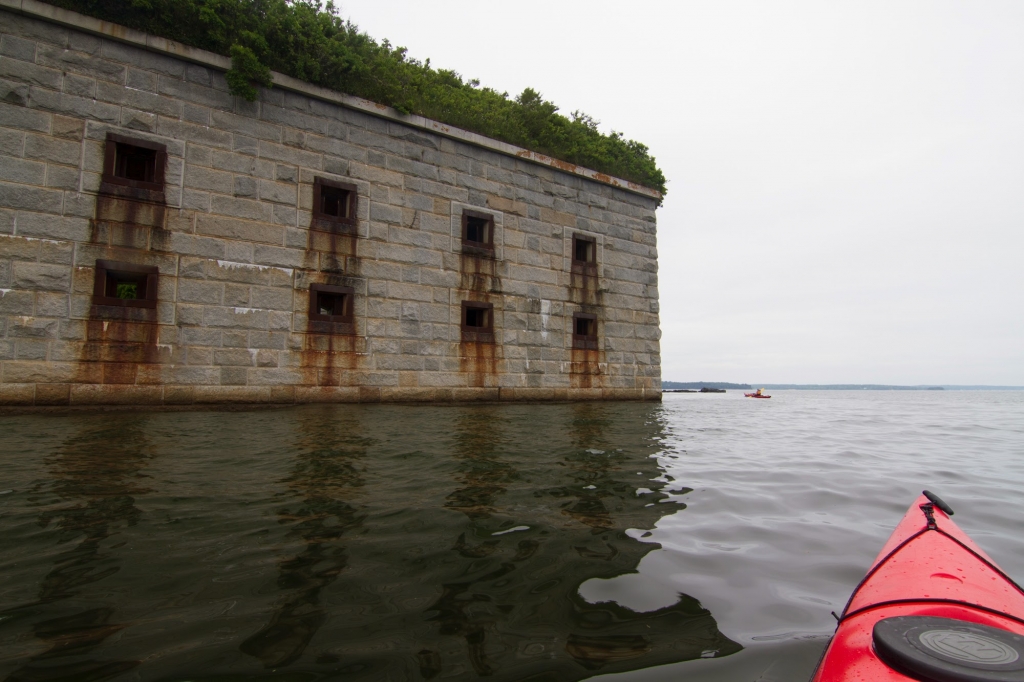
<p>On the last day of our trip, the seas were forecast at 3-5 feet in the bay, and we had overcast skies with a little rain. We paddled for a few hours in those conditions, with rolling seas and winds altering our course back to the harbor. So we decided to make one last quick stop at old Fort Gorges—the prominent structure built on Hog Island Ledge, seemingly floating right on the water in the mouth of the harbor.</p>

<p><img src="http://www.turnwall.com/wp-content/uploads/2014/06/IMG_4262-1024x682.jpg" alt="IMG_4262" /></p>

<p>Approaching Fort Gorges—the last point on our trip before crossing the shipping lanes back into South Portland inner harbor.</p>

<p>After a quick tour, we got back in the boats and paddled to a safe vantage point just southwest of the fort. I took out the radio and made a sécurité call.</p>

<p>“Sécurité sécurité sécurité. This is red seakayak, red seakayak, red seakayak. Two kayaks plan on crossing from Fort Gorges/Hog Island Ledge, southwest to Bud Light/Spring Point, South Portland. Due to winds, crossing expected to take up to 35 minutes. Expected completion time 14:30. Any interested parties, listening on one six. Repeat.”</p>

<p>Before I got a chance to repeat and out of nowhere, I finally got a call back! The first time another boat actually acknowledged any call of mine! And quite a boat it was…</p>

<p>“Sea Kayak, Sea kayak, this is [I can’t remember the name of the vessel] tanker. We’d appreciate it if you could hold off your crossing for about ten minutes or so until we pass your location—we don’t want to run you over. Over.”</p>

<p>“[Name] tanker, [name] tanker. Affirmative. We’ll wait here until we see you pass. Over.”</p>

<p>“Thanks guy. [Name] tanker OUT.”</p>

<p>So there we sat, bobbing in the waves, for about ten minutes until a behemoth grey tanker passed in front of us—standing a few stories out of the water. It was definitely moving faster than we could have gotten out of it’s way, and our crossing time definitely would have put us directly in it’s path.</p>

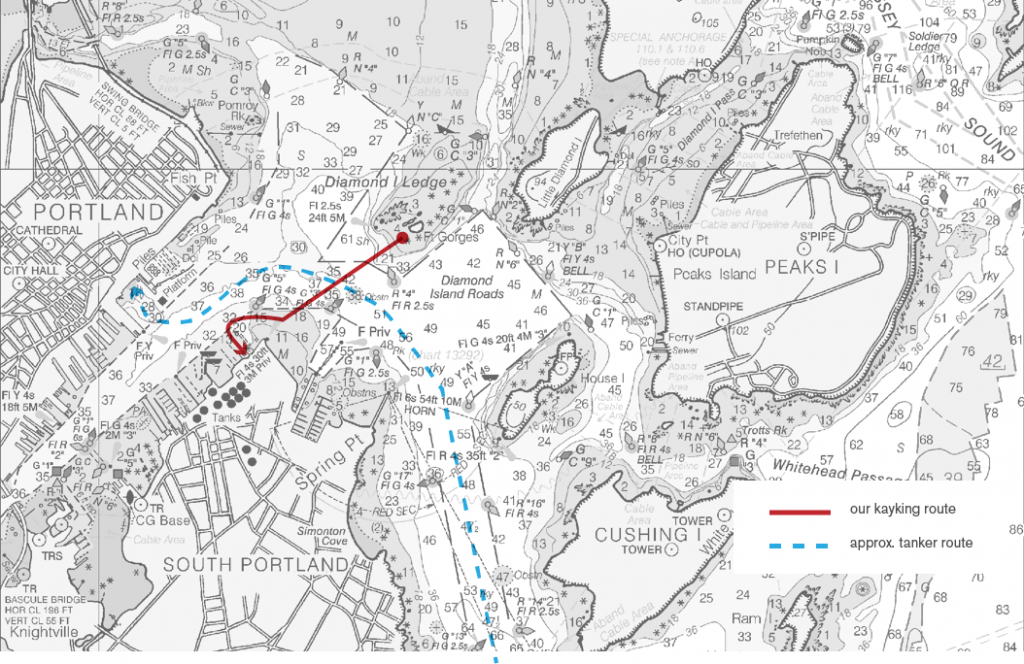
<p><img src="http://www.turnwall.com/wp-content/uploads/2014/06/portland-map-1024x664.png" alt="portland-map" /></p>

<p>Our location and route in Portland Harbor, and the route of the tanker passing when we made the sécurité call.</p>

<p>We waited until it passed and I made another sécurité call… this time with no response.</p>

<p>I repeated and waited for about a minute with no response, and then ventured across.</p>

<p>We made it back to our dock, safe and sound, and I was feeling pretty good about having made that call—and honestly just thought it was really cool that I had just communicated with a giant tanker from the seat of my tiny plastic boat.</p>

<p>Then, another cool thing happened. A man came jogging down the dock towards us as we unloaded our boats.</p>

<p>“Hey, are you the kayakers that just made those security calls?”</p>

<p>“Um, yeah, that’s us.”</p>

<p>I wasn’t sure if this was a good or bad thing—for a minute I thought I was in trouble. He thrust his hand out.</p>

<p>“Thank you—really. I wish all of you guys did that. I drive one of the water taxis and I’ve never heard a kayaker do that. Honestly, most of the boats around here think of kayakers as a nuisance—but it’s not that we’re against you guys, it’s just that you’re so hard to see in the waves, and we don’t want anyone to get hurt. Plus, a lot of the tourists just don’t know what they’re doing. That’s smart, what you did—so thanks, and tell your friends to do the same!”</p>

<p>(I’m paraphrasing here, as I don’t remember it verbatim, but this was pretty close.)</p>

<p>He shook my hand, jogged back down the dock to his taxi boat, and sped away.</p>

<h3 id="the-moral">The moral</h3>

<p>So again, the moral of the story is <strong>even if you never get a response back, people are listening</strong>, and they appreciate it. At least this guy and the tanker did. Now I’m “telling my friends”, as he suggested.</p>

<p>If you’re kayaking in the ocean, or around any other boating traffic, invest in a handheld VHF and learn how to use it. It might just save your life, or somebody else’s.</p>

<p>Here’s some more info to get you started…</p>

<h2 id="proper-vhf-usage-and-sécuritécalls-for-kayakers">Proper VHF usage and Sécurité calls for kayakers</h2>

<h3 id="a-quickoverview">A quick overview</h3>

<p>Sécurité calls are one of the three main safety communications you hear on the water, akin to the generally well-known “mayday”. All safety and emergency messages are communicated on VHF channel 16 (pronounced “one six”) in the coastal waters of the United States.</p>

<p>All of the words derive from French and are listed below, in order of urgency:</p>

<ol>
  <li>
    <h4 id="mayday-">Mayday** **</h4>
  </li>
</ol>

<p><em>(Believed to have originated from the French “venez m’aider” meaning “come help me”.)</em> This call is to report <strong>grave and immediate</strong> danger to life or vessel, and request immediate, emergency assistance.</p>
<ol>
  <li>
    <h4 id="pan-pan">Pan Pan</h4>
  </li>
</ol>

<p><em>(Pronounced “pon pon”,  from the French word panne, meaning “a breakdown”.) </em>This call is to report an <strong>urgent</strong> dangerous situation, where there is not <em>immediate</em> danger of loss of life or property. By making this call, you are requesting assistance, though not an “emergency” response.</p>
<ol>
  <li>
    <h4 id="sécurité-">Sécurité** **</h4>
  </li>
</ol>

<p><em>(Pronounced “see-cure-it-tay”, from the French word of the same spelling meaning “safety”.) *This call is to warn other vessels of any <strong>safety hazards,</strong> including use by the coast guard to communicate important meteorological messages. In the case of kayakers—</em>you* actually <em>are</em> the safety hazard—you’re reporting your own location so other vessels are aware of it.</p>

<p>It is important to remember that VHF transmissions are broadcast to every receiver in range—so all the boats in the area will hear your messages. For this reason, it is important to keep them brief and make them only when necessary so as to not congest the channel, lest another party should need to radio an emergency. These are very serious! The <a href="http://www.uscg.mil/hq/cg5/cg534/sarfactsinfo/SARisNOjoke.asp">penalties for a false distress call</a> <em>(mayday)</em> in the U.S. include fines up to $250,000 and up to 6 years in prison, plus having to reimburse the coast guard for the cost of the search.</p>

<p>While the Coast Guard will generally reply in the United States, it is possible that your location could be closer to another boat, and they may respond first (as is the case with my story above).</p>

<h3 id="the-sécuritécall-procedure">The sécurité call procedure</h3>

<p>So, I know the actual interaction described above wasn’t technically “correct” VHF usage, according to Coast Guard regulation. Listening in around major ports (I do most of paddling in Boston Harbor), it doesn’t seem like most crafts actually follows this protocol, other than the Coast Guard themselves. But, I generally try to stick to it as best I can.</p>

<p>From what I’ve been told, and my research, this is the proper way to make a securite call: (specifics/locations added from story above). <em>Please note that this information is from my own experience and I am NOT an expert authority on this. If you’re unsure, you should contact the coast guard.</em></p>

<p>“Securite sécurité sécurité. All stations. All stations. All stations. This is Red Seakayak, Red Seakayak, Red Seakayak. Safety message concerning Fort Gorges/Hog Ledge to Bug Light/South Portland Harbor. Two kayakers planning on crossing southwest from Fort Gorges/Hog Ledge to Bug Light/South Portland Harbor, expected time 35 minutes for completion 14:30.Out.”</p>

<h4 id="heres-the-procedure">Here’s the procedure:</h4>

<ol>
  <li>Say “<strong>sécurité</strong>” three times <em>(pronounced “sey-cure-it-tay”)</em>.</li>
  <li>Say “<strong>all stations</strong>” three times. (This alerts all crafts listening that this message is pertinent to them.)</li>
  <li>Say your <strong>call sign</strong> three times. (Since you don’t have a boat name, use something descriptive like “red seakayak”.</li>
  <li>Say “<strong>safety message concerning</strong>” followed by your general location. Be as specific as possible with your location, including your heading and major navigation waypoints on the chart.</li>
  <li>Now, <strong>state your specific situation</strong>, which should include where you’re starting from, where you’re going, your heading, and the timing.</li>
  <li>Say “<strong>repeat</strong>“.</li>
  <li>Wait a 10-20 seconds for a response. If none, repeat the entire message, steps 1-5.</li>
  <li>Say “<strong>out</strong>” this time, signaling that your communication is complete.</li>
</ol>

<h3 id="some-tips">Some tips</h3>

<h4 id="saying-repeat-after-your-message">Saying “repeat” after your message?</h4>

<p>I think, technically, you’re supposed to repeat all sécurité calls at least once—as described above (steps 6-8). In practice, I generally don’t hear most boats doing this, save for very large cruise ships and tankers entering or exiting the harbor, and the coast guard. Sometimes, I feel like I’m taking up too much time on the radio repeating a message, but then again, your radio as a kayaker is underpowered compared to most other boats, and you have to contend with environmental noise like waves and wind, so it’s probably a safe bet to repeat your message just in case the first one didn’t come through clearly.</p>

<h4 id="saying-break-to-divide-a-long-message">Saying “break” to divide a long message?</h4>

<p>The Coast Guard often broadcasts messages with a “break”—meaning the message is being divided into multiple parts. Saying “break” signifies that the message will continue after a short pause. This is done to clear the air momentarily, in case a more important emergency message must be broadcast (remember, this is happening on channel 16—the universal emergency channel all boats listen to). I generally don’t think kayakers would need to do this—you should be keeping your messages succinct anyways, and keeping your message to one chunk seems more efficient to me.</p>

<h4 id="saying-sécurité-vs-security-call">Saying “sécurité” vs. “security call”<em>**</em></h4>

<p>I hear lots of commercial boats simply saying “security call, security call” instead of the proper “sécurité” repeated three times. They’re both the same thing, from what I gather, but the technically correct procedure is to use the term “sécurité” three times (pronounced “sey-cure-it-tay”).</p>

<h4 id="you-need-a-map-chart">You need a map (chart)</h4>

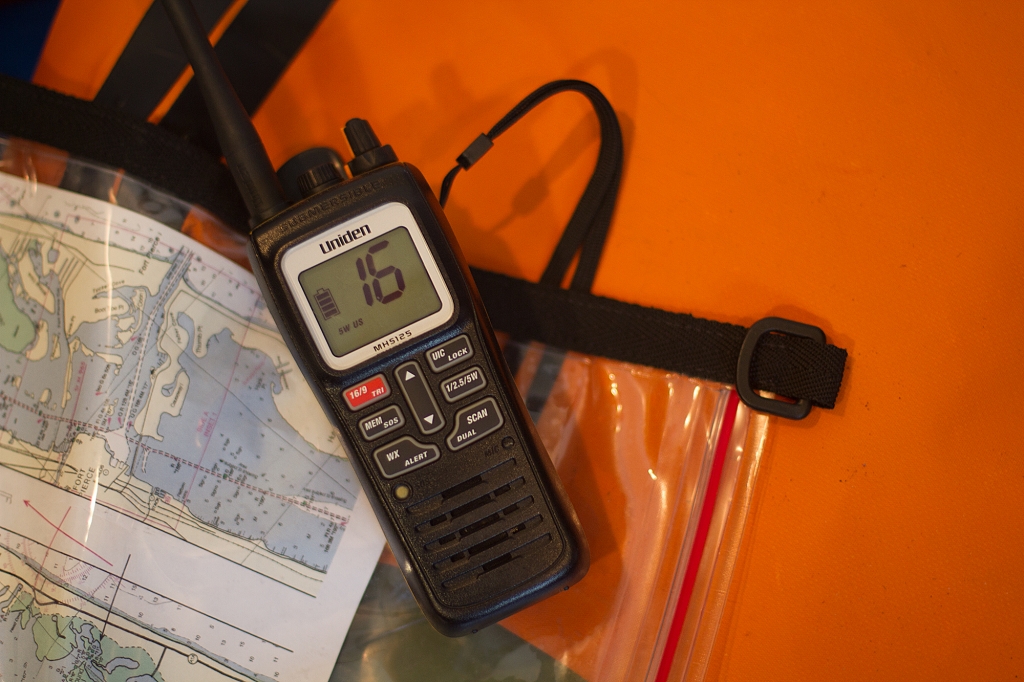
<p>You can’t make useful safety calls unless you know exactly where you are and can accurately relay this info to other parties. You need a nautical chart which marks obvious waypoints and buoys (use the approved NOAA charts, which you can <a href="http://ocsdata.ncd.noaa.gov/BookletChart/AtlanticCoastBookletCharts.htm">download and print for free in a handy format for kayakers from their website</a>). You’ll want to make sure your map is waterproof (either get the waterproof ones, or put your printed maps in a water-tight map case). And obviously, you need to know how to read it. Take some time to learn how the charts work. And, even if you have a GPS unit, you don’t want to rely solely on it (batteries, mechanical issues)—plus, it’s way easier to glance down at a big map in front of you than it is a tiny screen, especially with a paddle in your hands. Oh, and make sure it’s connected to your kayak somehow, so you don’t loose it in the wind. Most map cases (like the one in the photo atop this post and in the next photo below) have plastic rings that you can use to strap to your deck rigging or spray skirt with a small carabiner or parachute cord.</p>

<h4 id="you-need-a-compass">You need a compass</h4>

<p>And know how to use it—this goes along with needing to understand the map, and how to give headings. There are various types of deck-mounted compasses for kayaks, but a small hand-held hiking compass does the trick also (I keep mine on a string connected either to my PFD or my map case).</p>

<h4 id="never-say-over-and-out">Never say “over and out”</h4>

<p>“Over” specifically means you are soliciting a reply from a specific hailed party (such as the coast guard, or another vessel). “Out” specifically means you are completely done transmitting your message. Therefore, saying the two together is a contradiction and will mark you as a noob. That’s something you might hear a trucker say on a CF radio or in the movies, but is not correct nautical communication.</p>

<h3 id="my-vhf-radio--suggested-equipment">My VHF radio &amp; suggested equipment</h3>

<p>Whatever you get, I recommend something that:</p>

<ul>
  <li>is completely water proof and submersible</li>
  <li>floats</li>
  <li>has a strong connection point for a leash</li>
  <li>has standard VHF, plus weather channels</li>
  <li>can take standard (AA, AAA, D, etc.) batteries—at least as a backup</li>
</ul>

<p>In case you’re wondering what radio I use, it’s the <a href="http://www.uniden.com/marine-electronics/submersible-handheld-two-way-vhf-marine-radio/invt/mhs125g">Uniden MHS125</a>. I can only speak to this particular radio, as it’s the only one I’ve ever had, but I love it.</p>

<p><img src="http://www.turnwall.com/wp-content/uploads/2014/06/vhf-1024x682.jpg" alt="vhf" /></p>

<p>Photo of my radio and waterproof map case. Note the plastic ring on the case, which you can use to secure it to your deck rigging or spray skirt.</p>

<p>It meets all of the criteria above, plus it runs on rechargeable lithium-ion batteries, and comes with a wall charger, as well as a car charger. But in addition to that, it comes with a backup battery pack that you can fill with 4 AA batteries for those long trips where you can’t charge. The life of the unit is great—the lithium-ion batteries were fine for all of the five day trip—it was down to about a quarter full when we got back (and made the call to the tanker). But if you’re on a longer trip, you can always have 4 AA’s handy.</p>

<h2 id="your-thoughts">Your thoughts?</h2>

<p>On the off chance that another kayaker in the northeast find this—hope to see you out there one day, and if you see me, give me a shout on the VHF.</p>

<p>I’d love to hear in the comments section below of anyone else’s experiences with VHF radio usage, and/or any suggestions or comments about the usage described above.</p>

<p>Happy paddling.</p>]]></content><author><name>alturnwall</name></author><category term="Adventure" /><summary type="html"><![CDATA[It’s kayaking season here in New England, and as I was returning to the water this year I realized I needed to reacquaint myself with VHF radio usage.]]></summary></entry><entry><title type="html">Laser-etched Tap Handles</title><link href="/articles/laser-etched-tap-handles/" rel="alternate" type="text/html" title="Laser-etched Tap Handles" /><published>2014-06-20T00:00:00+00:00</published><updated>2014-06-20T00:00:00+00:00</updated><id>/articles/laser-etched-tap-handles</id><content type="html" xml:base="/articles/laser-etched-tap-handles/"><![CDATA[<p>I recently had the honor of being the best man in my best friend’s wedding, which is an occasion that calls for a unique gift. The groom and I are both pretty big into homebrewing, and he kegs, so my own fiancé recommended that I get him some tap handles.</p>

<p>Well, I couldn’t find any out there that really seemed fitting, and I wanted something special, so I decided I’d have to customize.</p>

<p>I had seen the idea to use chalkboard paint on tap handles so you have the ability to “write in” what’s on tap, and I knew I wanted to get something engraved on them that was pretty special. The bride and groom are both avid cyclists and sent out this really amazing “save the date” with a picture of her chasing down him on a bike (which is a long story, but how they met). I decided I wanted to use the image from their special “save the date” on a “his” and “hers” tap handle.</p>

<p>A Google search yielded this great shop on Etsy that not only does the chalkboard paint, but allows you to laser-etch your own design into a wooden handle: <a href="https://www.etsy.com/shop/Brewedover">Brewedover</a>. Terry, the owner and woodworker, was super helpful and did a really great job on these.</p>

<p>Here’s the vector design I submitted to him:</p>

<p><img src="http://www.turnwall.com/wp-content/uploads/2014/06/handles-vector-1024x497.png" alt="Tap handle vector design" /></p>

<p>And here are the resulting handles:</p>

<p><img src="http://www.turnwall.com/wp-content/uploads/2014/06/handles-web-1024x682.jpg" alt="Finished laser-etched tap handles" /></p>

<p>Shown again next to the image that inspired them:</p>

<p><img src="http://www.turnwall.com/wp-content/uploads/2014/06/handles-picture-web-1024x682.jpg" alt="Tap handles next to the save-the-date photo that inspired them" /></p>

<p>Basically: you can’t go wrong when you combine lasers, bikes and beer.</p>

<p>(And the bride and groom are pretty great too. Congrats!)</p>]]></content><author><name>alturnwall</name></author><category term="Making" /><summary type="html"><![CDATA[I recently had the honor of being the best man in my best friend’s wedding, which is an occasion that calls for a unique gift. The groom and I are both pretty big into homebrewing, and he kegs, so my own fiancé recommended that I get him some tap handles.]]></summary></entry></feed>